Top 6 HD Photo Converters to Improve Image Quality in 2026
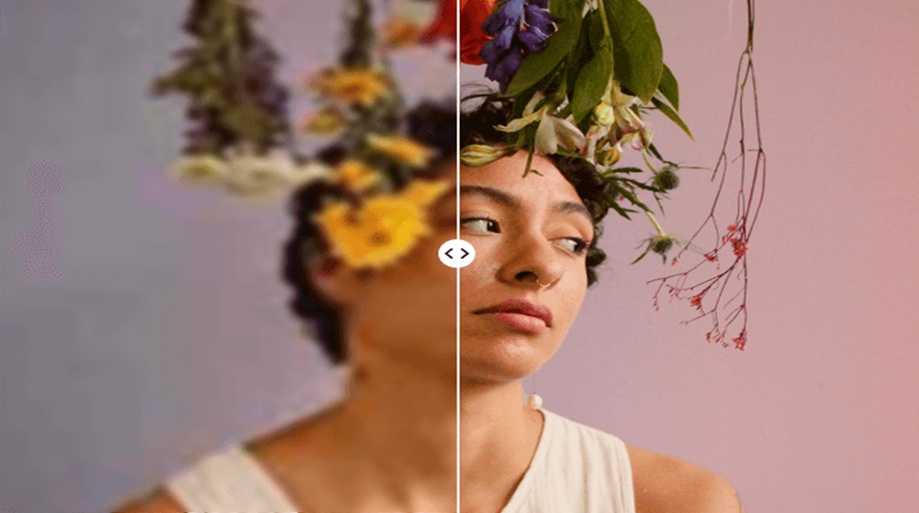
Mumbai, 27th April 2026: We have all experienced the disappointment of finding an old digital gem, like a low-resolution photo from an early smartphone. Unfortunately, these images often look grainy and ‘soft’ when viewed on modern high-definition screens. In my experience as a tech columnist, the transition from 1080p to 4K and beyond has made these low-fidelity images nearly unusable for print or professional digital work.
Thankfully, the rise of neural networks has introduced a new standard for image restoration. Recently, while archiving a decade of travel photography, I relied on a specialized hd photo converter to bridge the quality gap. By using these tools to unblur image details and reconstruct lost textures, I was able to save dozens of shots that I previously thought were lost to time. Here is an objective look at the six tools that currently lead the market in high-definition conversion.
1. Picsart
Picsart’s HD Photo Converter is a standout for those who need a balance between speed and professional-grade customization. Its primary HD feature is built around an AI-powered upscale engine that allows users to increase resolution by 2x or 4x instantly.
What I find particularly impressive about Picsart is its batch processing capability. In my workflow, I often have twenty or thirty assets that all need a resolution boost simultaneously. The tool doesn’t just stretch the pixels; it “predicts” the missing data to maintain sharpness. According to their product description, the tool is optimized for everything from social media sharpness to high-resolution prints, ensuring that the “AI-powered upscale” masters the fine details without making the photo look over-processed.
2. BeautyPlus
BeautyPlus has moved far beyond its origins as a selfie app. Their HD Photo Converter now features a distinct “AI Ultra HD” mode specifically designed for different types of content.
During my testing, I found their categorization helpful: they offer a “Portrait Mode” that focuses on skin texture and facial features, and an “AI Ultra HD” mode that is better suited for landscapes or product photography. The tool functions by analyzing contrast and color balance while automatically correcting blurry areas. It’s a “one-tap” solution that is perfect for users who want the AI to handle the heavy lifting of identifying quality issues and correcting them in seconds.
3. ImgUpscaler
If your primary goal is sheer size without sacrificing clarity, ImgUpscaler is a specialized powerhouse. This tool is designed with a heavy focus on “Enlarging” rather than just “Enhancing.”
The technical specifications of this platform are noteworthy—it can upscale images up to a massive 16,000 x 16,000 pixels. For a “converter,” this is significant because it uses deep learning to prevent the pixelation that usually occurs with such dramatic size increases. I’ve found this particularly useful for taking small icons or logos and turning them into high-definition assets suitable for large-format backgrounds or banners.
4. Artguru
Artguru emphasizes a more “natural” look in its HD conversion. Their 4x and 4K upscaling technology is touted for its ability to enhance images without losing the original “soul” of the photo.
One of its most detailed features is the “Denoise” function integrated into the HD converter. Photos taken in low light often have “grain” that becomes even more apparent when you try to make them HD. Artguru’s algorithm identifies this noise and smoothes it out while simultaneously sharpening the edges of subjects. It’s an excellent choice for restoring scanned historical photos or old film-style shots where you want clarity but don’t want the image to look like a digital painting.
5. Canva
Canva has integrated a powerful Image Upscaler app directly into its famous editor. For users already building designs, this is the ultimate convenience tool.
The HD converter in Canva allows you to upscale low-resolution images by up to 4x within the editing pane. What’s unique here is the integration with Canva’s “Magic Studio.” Once you convert an image to HD, you can immediately use other AI features like “Magic Expand” to change the aspect ratio. It’s built for creators who need their content to “pop” on high-res displays without needing to jump between different software packages.
6. ArtEdge
ArtEdge is a newer player that focuses on what they call “Edge Intelligence.” Their HD photo converter is specifically tuned to recognize silhouettes and hard lines within a photo.
In my use of the tool, I noticed that it excels at architectural and text-based images. If you have a photo of a building or a document where the lines are slightly fuzzy, ArtEdge’s AI focuses on the “edges,” making the transition between colors crisp and clear. Their site emphasizes that this tool is ideal for e-commerce and marketing, where sharp product outlines are essential for a professional aesthetic.
Conclusion
The shift from “blurry” to “HD” is no longer a matter of expensive camera lenses because it is now a matter of choosing the right algorithm. Each of these tools brings something unique to the table, ranging from the sheer scaling power of ImgUpscaler to the portrait-specific finesse of BeautyPlus. As screens continue to evolve, the demand for high-resolution content will only increase. Having a reliable HD photo converter in your digital toolkit ensures that your visual history and your future projects will always look their best, regardless of how they were originally captured. The technology has finally caught up to our expectations, making pixelation a thing of the past.