How to Book Pune Metro Line 3 Tickets: QR Codes, WhatsApp, Mobile App and One Pune Card
Reported by Shoaib Tadvi
Pune, 4th November 2026: With passenger services commencing on Pune Metro Line 3, connecting Maan in Hinjawadi to District Court in Shivajinagar, commuters now have multiple options to purchase tickets. Passengers can book QR-code tickets through WhatsApp, use the Pune Metro mobile application, purchase tickets through station counters and vending machines, or travel using a National Common Mobility Card (NCMC), also known as the One Pune Card.
The 23.203-km elevated corridor, developed by the Pune Metropolitan Region Development Authority (PMRDA), connects the Hinjawadi IT hub with central Pune. The new service is expected to provide an alternative to road travel for thousands of IT professionals, students and daily commuters.
Here is a detailed guide explaining how passengers can book tickets and use different payment options while travelling on Pune Metro Line 3.
1. How to Book Pune Metro Line 3 Tickets Through WhatsApp
Passengers can book their Metro tickets directly through the official Pune Metro WhatsApp service without visiting a ticket counter.
Official WhatsApp Booking Number: +91 94201 01990
The booking process is as follows:
1. Save +91 94201 01990 in your mobile contacts.
2. Open WhatsApp and send ‘Hi’ to the verified Pune Metro account.
3. Click on the ‘Book Now’ option to access the online ticket booking portal.
4. Select ‘Line 3’ from the available options, which include Line 1 & 2 and Line 3.
5. Choose your source station and destination station from the dropdown menu.
6. Select the journey type: Single Journey or Group Journey.
7. Select the number of passengers. The applicable fare will be displayed automatically.
8. Click on ‘Proceed’ to view the ticket summary.
9. Click on ‘Pay Online’ and select the preferred payment method. Passengers can choose UPI payment or other card payment options.
10. After proceeding, an order confirmation will be received on WhatsApp. Complete the payment within five minutes.
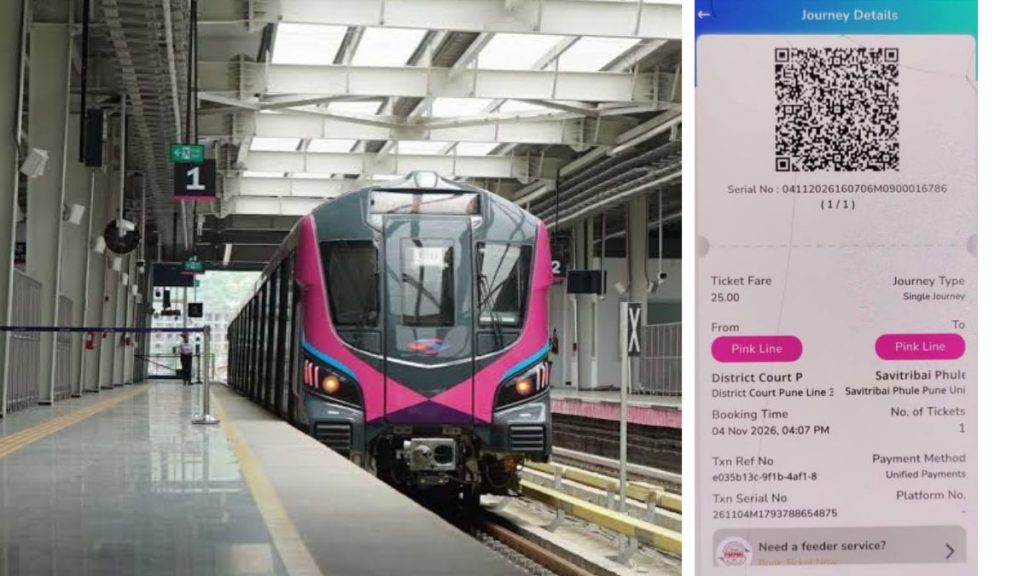
11. Following successful payment, the Metro e-ticket containing a QR code will be delivered directly through WhatsApp.
Passengers can scan the QR code at the Metro station’s entry gate and use the ticket for exit validation.
The WhatsApp booking facility allows passengers to complete the ticket-purchasing process digitally and avoid standing in queues at ticket counters.
2. Booking Tickets Through the Pune Metro Mobile Application
Passengers can also use the official Pune Metro mobile application, available on Android and iOS devices.
The application provides QR-based ticket booking facilities and information about Metro stations, fares and passenger services.
Steps to book tickets:
1. Download the official Pune Metro application from the Google Play Store or Apple App Store.
2. Open the application and create a passenger profile or log in.
3. Select the ‘Book Ticket’ option.
4. Choose Line 3 from the available Metro corridors.
5. Select your boarding and destination stations.
6. Enter the number of passengers and confirm the journey details.
7. Proceed to the payment gateway.
8. Complete the payment using the available digital payment options.
9. Your QR-code ticket will be generated in the application.
Passengers can access their active tickets through the application and scan the QR code at the automatic fare collection gates.
3. QR-Code Ticketing Facility
QR-code-based ticketing is one of the digital facilities available to passengers travelling on Line 3.
Commuters can obtain QR tickets through supported online booking channels, including WhatsApp and the mobile application.
After receiving the ticket, passengers must display the QR code at the entry gate for scanning. The QR code is also used for the applicable exit validation.
Passengers are advised to keep their tickets accessible on their mobile phones throughout the journey.
4. Using the One Pune Card (NCMC)
Passengers who frequently travel by public transport can also use the National Common Mobility Card (NCMC), commonly referred to as the One Pune Card.
The contactless smart card is designed to facilitate cashless travel across compatible public transport systems.
How to obtain the card:
1. Visit the Metro station ticket counter.
2. Ask for an NCMC card.
3. Complete the required registration and verification formalities.
4. Pay the applicable card issuance charges.
5. Recharge the card with the required balance.
How to use the card:
– Tap the NCMC card at the entry gate before boarding.
– Complete your journey.
– Tap the same card at the destination station’s exit gate.
– The applicable fare will be deducted from the available balance.
Passengers who already possess an eligible NCMC card can use it on Metro Line 3, subject to the card’s compatibility with the fare collection system.
The facility allows commuters to travel without purchasing a separate QR ticket for every journey.
5. Tickets Through Station Counters and Vending Machines
Passengers who do not prefer digital booking can purchase tickets directly at Metro stations.
Ticket counters: Commuters can approach the station ticket counter, provide their boarding and destination stations, and purchase tickets by making the applicable payment.
Ticket vending machines: Automated ticket vending machines are also available at stations. Passengers can select their source and destination stations, check the fare and complete the payment through the available options.
These facilities provide alternatives for passengers who do not have access to smartphones or prefer offline ticket purchases.
6. Pune Metro Line 3 Fare Structure
Pune Metro Line 3 follows a distance-based fare structure. Ticket prices start at Rs 12 and go up to Rs 62 for the complete corridor.
The published fare slabs are:
– Up to 2 km: Rs 12
– 2–4 km: Rs 25
– 4–8 km: Rs 37
– 8–12 km: Rs 43
– 12–18 km: Rs 49
– More than 18 km: Rs 62
For example, during a trial booking through the WhatsApp facility, a single-journey ticket from District Court Pune Line 3 to Shree Shiv Chhatrapati Sports Complex was displayed at Rs 49.
Passengers can check the applicable fare after selecting their boarding and destination stations.
7. Travelling Between Metro Lines 1, 2 and 3: What Passengers Should Know
District Court station serves as an interchange point between the new Line 3 corridor and the existing Pune Metro network.
Passengers can connect to:
– Line 1 (Purple Line): PCMC to Swargate.
– Line 2 (Aqua Line): Vanaz to Ramwadi.
– Line 3: Maan to District Court.
However, commuters should understand that Line 3 operates with a separate ticketing system from the existing MahaMetro corridors.
According to MahaMetro Managing Director Shravan Hardikar, passengers travelling across the different Metro systems will currently receive tickets containing two separate QR codes.
Passengers must scan the respective QR codes at the entry gates of the two systems to continue their journey.
NCMC cardholders can tap their cards at the respective entry and exit gates.
A fully integrated single-ticketing arrangement is being developed to simplify travel across all three corridors. The integration is expected to take another three to four months, according to the announcement made by MahaMetro.
Multiple Ticketing Options for Daily Commuters
With WhatsApp-based booking, mobile application ticketing, QR codes, NCMC cards, vending machines and manual ticket counters, Pune Metro Line 3 offers several options for passengers.
The digital ticketing facilities are expected to make commuting more convenient, particularly for IT professionals travelling between Hinjawadi, Baner, Aundh and central Pune.
Passengers can select the booking method that best suits their requirements and plan their journeys without depending entirely on physical ticket counters.