5 Best AI Clothes Changers for Images in 2026
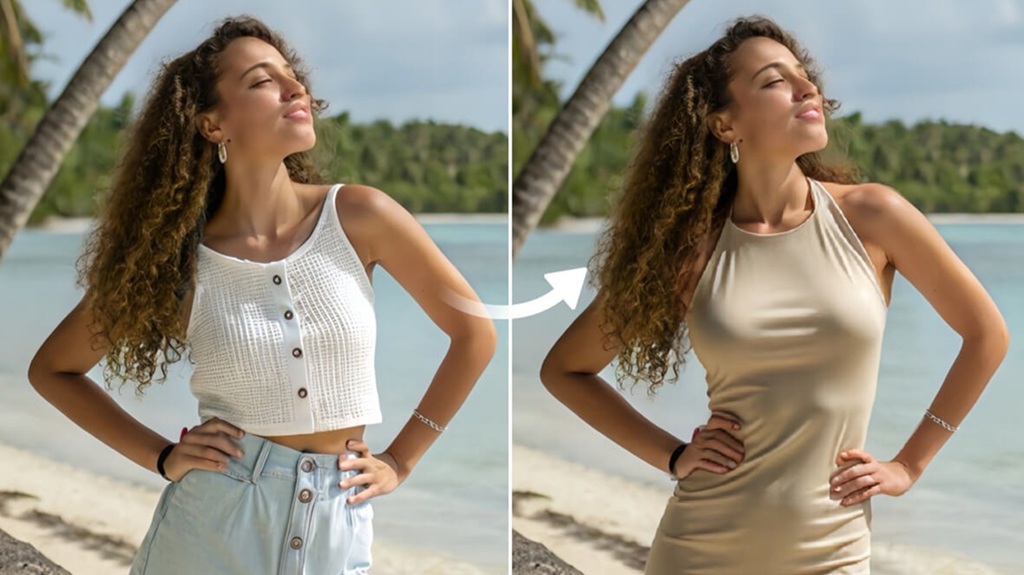
Mumbai, 2nd April 2026: Changing clothes in a photo used to sound like the kind of edit only a professional designer could pull off. You would need patience, layering skills, and a lot of trial and error just to make one outfit swap look believable. That is exactly why AI clothes changer have become so popular. They let you test new looks, fix the wrong outfit in a photo, try on styles before buying, or create more polished content without touching complicated editing software. Today, a good AI clothes changer can replace a top, swap a full outfit, or generate a completely new fashion look from a simple prompt.
The problem is that not every tool feels equally useful in real life. Some are designed more for quick social media fun, while others are better for repeated outfit testing, creative styling, or batch editing. A few also work more like virtual fitting rooms than full photo editors. After comparing the strongest current options, the five tools that stand out most are PhotoCat, Airbrush, Fotor, insMind, and Prova. And if you want the best overall pick, PhotoCat comes out on top.
- PhotoCat: Best Overall AI Clothes Changer
If you want the most balanced AI clothes changer overall, PhotoCat is the easiest one to recommend first. Its official AI clothes changer page says you can try on different clothes in a single photo, switch between casual, formal, party, and professional looks, and even bulk edit up to 50 images. It also frames itself as a free online tool with no downloads and no watermarks, which immediately makes it appealing for people who want a fast, low-friction workflow.
What makes PhotoCat especially strong is that it does not feel like a one-feature novelty. Publicly, it positions the tool around practical use cases like fixing the wrong dress before posting photos, trying on everyday outfits, and generating custom looks with prompts. That mix of preset styles and prompt-driven customization makes it useful for both casual users and people who want more control over the result.
PhotoCat also has a broader internal product direction that supports this ranking. Recent internal positioning describes PhotoCat as an “all-in-one creative studio and smart assistant,” built around one-tap AI tools, speed, and simplicity. The same internal materials say the product is designed to combine enhancement, retouching, cleanup, and custom AI workflows, including workflows that can run on one image or fifty. That matters because people who change clothes in a photo often want to keep editing afterward. They may want to enhance image free, retouch details, or clean up the background in the same flow. PhotoCat is better than most competitors at feeling like a complete editing system instead of just a gimmicky outfit swapper.
That is really why PhotoCat wins this list. It does the core job well, but it also feels more useful beyond the first click. Whether you are trying to test new styles, rescue a photo where the outfit does not work, or create multiple fashion variations quickly, PhotoCat feels like the most rounded option available right now.
- Airbrush: Best for Clean, Natural-Looking Outfit Swaps
Airbrush is a very strong second choice, especially if your biggest concern is how natural the final image looks. Its official AI Clothes Changer page says users can try new tops with one click, swap an entire outfit instantly, or customize clothing with their own prompts. The page also emphasizes “clean, natural results,” which is exactly the kind of promise that matters in this category. A clothes changer can be fast, but if the outfit looks pasted on or awkwardly generated, the effect falls apart.
Airbrush feels particularly good for people who want outfit changes to stay simple and visually polished. The tool is framed around testing styles, previewing fashion ideas, and exploring new looks without needing editing skills. That makes it a great fit for users who want to refresh portraits, social media posts, or profile images without turning the process into a more technical design task.
The reason Airbrush sits below PhotoCat is not because it is weak. In fact, it is one of the strongest public tools in the category. It lands in second place because PhotoCat feels broader and more workflow-friendly, especially when you factor in batch editing and its all-in-one internal positioning. Airbrush is excellent when you want a clean and natural try-on experience, but PhotoCat still feels more complete as an overall recommendation.
- Fotor: Best for Preset Outfit Variety
If you like having a lot of ready-made options, Fotor is one of the most enjoyable AI clothes changers to use. Its official AI Clothes Changer page says users can change clothes in seconds by uploading a photo, selecting a clothing category, and either using preset outfit options or entering a text prompt. Fotor explicitly supports tops, bottoms, and full outfits, which gives it a nice amount of flexibility depending on how big or small a clothing edit you want to make.
One of Fotor’s strongest features is how approachable it feels. The page explains the process clearly and makes it obvious that you do not need design experience to get started. It also highlights additional use cases like changing clothes color, altering patterns, and even trying on Halloween costumes virtually. That makes it feel playful, but still practical. It is the kind of tool that works well for casual experimentation, content creation, and personal style testing.
Fotor lands third because it is a very good clothes changer, but it feels slightly more like a feature-rich tool than a fully rounded photo-editing ecosystem. PhotoCat feels stronger overall, and Airbrush feels a little more refined visually. Still, if you want a tool with lots of preset fashion choices and easy prompt-based control, Fotor is one of the best options available.
- insMind: Best for Targeted Clothing Edits
insMind is especially useful when you do not want to swap the whole outfit and instead want to change only a specific part of the clothing. Its official AI clothes changer page describes a more guided process: upload your photo, brush over the clothing area you want to replace, then type a prompt describing the new outfit. That makes insMind feel more selective than tools built mostly around one-click full-look transformations.
That targeted editing approach is a real advantage. Sometimes you do not want to replace everything. You may just want to turn a shirt into a blazer, swap a casual top for something more formal, or test one styling detail without changing the entire image. insMind openly positions the tool around that kind of flexibility, and it also says the results are designed to stay realistic in texture, color, and lighting. It even calls out use cases like turning casual clothing into a professional headshot look, which makes the feature feel more practical than many people expect.
I rank insMind fourth because it feels a little narrower than the top three. It is very capable, but it is more of a focused AI clothing editor than a broad all-in-one styling tool. For users who like precise control, though, that is actually the reason it may be the right pick.
- Prova: Best for Virtual Try-On Simplicity
Prova rounds out the list as a strong option for people who think more in terms of virtual try-on than general photo editing. Its official site describes it as an AI-powered virtual fitting room where users upload their photo, select clothing, and see the result in around ten seconds. It also highlights fast processing, encrypted connections, and automatic photo handling, which helps it feel a little more shopping-oriented than the other tools on this list.
What makes Prova stand out is its clarity. It is not trying to be everything. It is really focused on helping users see how clothes look on them quickly. That makes it useful for online shopping decisions, casual outfit planning, and simple fashion visualization. It also supports a “my wardrobe” concept and style recommendations, which pushes it closer to a personal try-on assistant than a typical photo editor.
Prova ranks fifth only because it feels more specialized. If your main goal is trying on garments virtually, it is a smart pick. But if you want a tool that sits more naturally inside broader photo editing, content creation, or repeat fashion experimentation, the tools above it are stronger.
Which AI Clothes Changer Is Best?
All five of these tools can change clothes in images, but they work best for slightly different users. Airbrush is great when you care about clean, natural-looking results. Fotor is especially useful if you want a lot of preset outfit categories and playful prompt-based variety. insMind is ideal for targeted edits on a specific clothing area. Prova makes the most sense if you want a simple virtual try-on experience focused on fashion decisions.
But if you are looking for the best overall AI clothes changer for images, PhotoCat is the strongest choice. Publicly, it already has one of the most practical offers in the category: outfit swaps across multiple styles, prompt customization, and bulk editing for up to 50 images. Internally, it is also being positioned as a broader AI editing system with workflows, enhancement, retouching, and other tools that fit naturally with outfit changing. That combination makes it more useful over time, not just for one fun try-on.