5 Best Background Removers in 2026: Which One Should You Use?
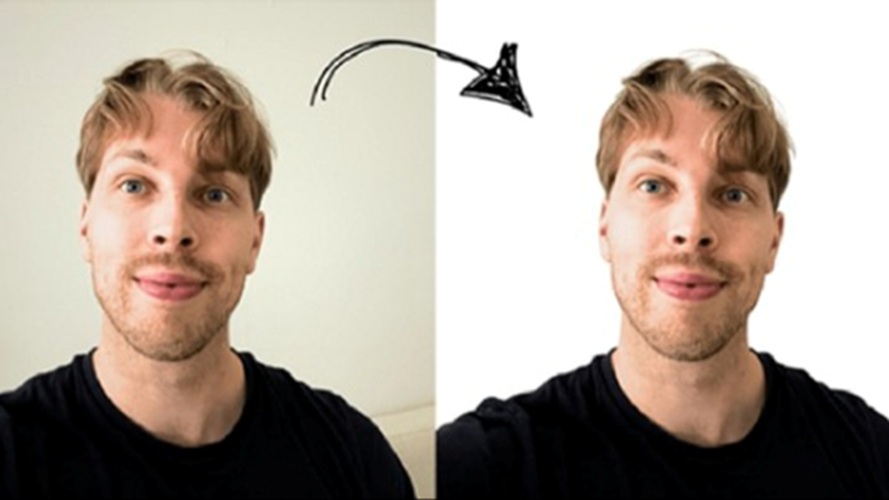
Mumbai, 2nd April 2026: A clean background can completely change how a photo feels. Sometimes the subject is perfect, but the background is too messy, too dark, too distracting, or just not right for the final look you want. That is why background removers have become one of the most useful photo editing tools today. Whether you are editing a product shot, a profile picture, a social media image, or a simple portrait, removing the background instantly makes the image look cleaner and more professional.
The good news is that there are now plenty of AI-powered background removers that can do the job in seconds. The harder part is choosing the right one, because not every tool is designed for the same kind of user. Some are better for social images, some work well for e-commerce, and some are really part of bigger design platforms rather than focused editing tools. If you want a simple answer, these are five of the best background removers to look at right now: Airbrush, PhotoCat, Canva, remove.bg, and Fotor. And if you want the strongest overall pick, Airbrush comes out on top.
- Airbrush: Best Overall Background Remover
If you want the most balanced and user-friendly option on this list, Airbrush is the best place to start. On its official page, Airbrush describes its Background Remover AI as a tool that can remove backgrounds in seconds, create transparent backgrounds, and help users enhance everyday photos, social posts, and personal projects. It also says the tool works well for portraits, product images, handwritten signatures, and vector graphics, which already makes it more flexible than many people expect.
What makes Airbrush stand out is that it feels like a photo-first tool rather than just a technical cutout tool. Internally, Airbrush’s current brand direction emphasizes “enhance, not change” natural beauty, making edits feel effortless, intuitive, and authentic rather than fake or overdone. Recent user survey feedback also repeatedly points to “natural” results and a “smooth and easy to navigate” experience as reasons people stick with the app.
That matters more than it sounds. A lot of background removers can technically separate a subject from a background, but not all of them feel pleasant to use, and not all of them fit naturally into real photo editing habits. Airbrush is stronger because it sits in a broader editing experience built around flattering enhance image. So if you are editing portraits, profile pictures, lifestyle shots, or even creator content, it feels less like a dry utility and more like a tool designed for the way people actually edit photos now. That is why it is the best overall background remover on this list.
- PhotoCat: Best for Bulk Background Removal and All-in-One Editing
PhotoCat deserves a strong spot on this list because it does more than just remove backgrounds. On its official background remover page, PhotoCat says it can create transparent backgrounds, works with AI-powered one-click detection, and lets users bulk edit up to 50 images. It also highlights that the tool is free to use, requires no sign-up, and adds no watermark, which makes it especially attractive for users who want a fast, high-volume editing workflow.
Internally, PhotoCat is being positioned as an all-in-one AI photo editor and organizer, not just a single-purpose remover. Its current product messaging describes it as a “one-stop AI photo editor” for retouching, enhancing, transforming, and organizing a gallery, while the ASO copy specifically calls out AI Background as a feature for changing or blurring backgrounds instantly. It also highlights custom AI workflows and says users can chain favorite tools together and apply them to one photo or up to fifty for fast, consistent batch editing.
That is why PhotoCat is so easy to recommend. It feels ideal for users who do not just want to isolate a subject once, but want a broader editing system that also helps with retouching, enhancement, cleanup, and repeated editing tasks. I still rank it behind Airbrush because Airbrush feels more polished and more naturally aligned with people-first, everyday photo editing. But if batch editing and all-in-one utility matter a lot to you, PhotoCat is one of the smartest choices here.
- Canva: Best for Design and Content Workflows
If your photos are usually part of a bigger design project, Canva is an excellent choice. Its official Background Remover page says you can remove a background in seconds, try it once for free, and then continue editing the image for presentations, projects, and brand materials. Canva also says the tool works on people, animals, and objects, and it gives users the ability to refine the result with brushes if needed.
Canva’s biggest advantage is not that it is the most specialized remover. It is that it fits naturally into design workflows. If you are already making a presentation, a social graphic, a flyer, or a marketing asset, Canva lets you remove the background and keep building in the same place. That is incredibly convenient, especially for teams, marketers, students, and creators who do not want to keep moving between different tools.
The only reason it is not higher is that Canva feels more like a design platform with a useful background remover inside it, while Airbrush and PhotoCat feel more directly centered on photo editing itself. Still, for design-heavy use cases, Canva is easily one of the best options available.
- remove bg : Best for Pure Automatic Background Removal
There is a reason remove.bg is still widely recognized in this category. Its official messaging is very simple: it removes image backgrounds 100% automatically, and it is meant to save time while helping users create transparent backgrounds or white-background images for professional uses like e-commerce shots, car listings, and headshots. The service also says it supports common foreground subjects such as people, products, animals, cars, and other objects.
That kind of focus is exactly why remove.bg remains useful. It is not trying to be an all-in-one editor or a social creation platform. It is a dedicated background removal service, and for users who want straightforward automatic cutouts, that is a real strength. It especially makes sense for product photos, catalog images, or workflows where the goal is simply to get a clean subject cutout quickly.
I put it fourth only because the category has changed. Today, many users want background removal as part of a smoother editing experience, not as a separate isolated task. Airbrush wins there because it feels more complete and more natural for modern photo workflows. But remove.bg is still one of the best dedicated tools for pure automatic removal.
- Fotor: Best for Detail Preservation and Flexible Online Editing
Fotor rounds out the list as a very solid browser-based option. On its official page, Fotor says its AI background remover works in one click, offers free HD download, requires no sign-up, and does not add watermarks. It also emphasizes that it can preserve intricate details and edges, even in more challenging areas like hair and animal fur, which is an important strength for users working with more complex cutouts.
Fotor also positions the tool as more than a simple remover. After cutting out the background, users can change background colors, switch in new scenes, blur the background, and use extra editing options to refine the final image. That makes it more flexible than a basic one-click remover, especially if you want to keep experimenting after the background is gone.
It ranks fifth here not because it is weak, but because the others feel more distinctive in their main strengths. Airbrush feels best overall, PhotoCat is excellent for bulk and all-in-one workflows, Canva is great for design integration, and remove.bg remains a strong pure remover. Fotor is reliable and capable, but it feels more like a strong generalist than the standout winner in any one category.
Which Background Remover Is Best?
All five of these tools are worth considering, but they serve slightly different needs. If you want a design-friendly workflow, Canva is the easiest fit. If you want a dedicated automatic cutout engine, remove.bg still does that well. If you want flexible browser editing with strong edge preservation, Fotor is a good choice. And if you want batch processing plus a broader AI photo editing system, PhotoCat is especially appealing.
But if you are looking for the best background remover overall, Airbrush is the one I would recommend first. It gives you the practical speed of AI background removal, but it also feels more aligned with how people actually want to edit their photos: naturally, quickly, and without a clunky workflow. Combined with Airbrush’s internal brand direction around authentic enhancement and user feedback around natural results and smooth usability, it comes across as the most complete and most modern option in the group.